WeatherLink
- 4.1
- Rating
- 100.00K
- Installs
- Free
- Price

 Analysis by App-foxy
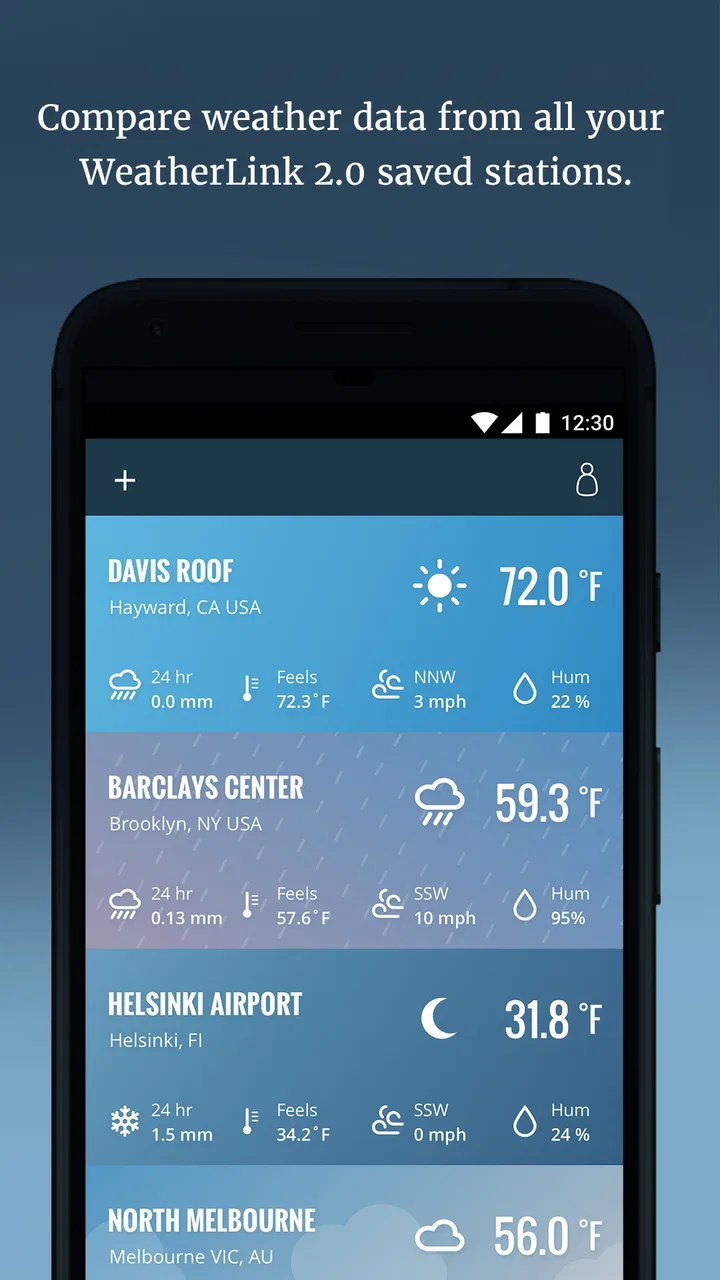
Weather decisions become surprisingly repetitive when you own a personal weather station. I often found myself checking the console, looking out the window, then opening a general forecast app to see whether the wider forecast agreed. That routine is exactly where WeatherLink earns its place. It brings data from a Davis station into a phone app and also lets me look at stations across the worldwide Davis WeatherLink Network, so I can move from “what is happening here?” to “what is happening nearby?” without switching between unrelated tools.
This is a free weather app from Davis Instruments, aimed less at people who simply want tomorrow’s temperature and more at users who already care about readings from a Davis weather station. The distinction matters. If you only need a quick forecast for a commute, a standard weather app is usually faster. If you want to check the conditions actually being measured around your home, garden, workshop, or property, this app has a much clearer purpose.
My overall impression is practical rather than flashy. WeatherLink is most valuable when it removes a small daily chore: walking to a console, finding a browser page, or trying to remember which local station has the most useful information. Its usefulness depends heavily on having access to a Davis station or finding relevant stations in the network, but within that setting it can turn personal weather data into something much easier to consult.
You May Also Like

 Blood Strike: 2.5 Anniversary
Blood Strike’s Loadouts Turn Every Drop Into a Tactical Gamble
A close look at Blood Strike’s custom loadouts: how fast access to signature weapons reshapes its battle royale rhythm, rewards preparation, and narrows the gap between fights.

 Pandora - Music & Podcasts
Pandora’s Music Is Easy to Start, but Harder to Recover
Pandora’s strength is its low-effort path from a seed to a station. Its weak spot is how much confidence it asks you to place in connection, setup, and quiet recovery.

 8 Ball Pool
 Is Built on Rivalries, Rematches, and Routine
A close look at the rivalries, rematches, shared routines, and unanswered safety questions that turn a quick pool match into a persistent mobile community.

 Samsung Music
’s Quiet Strength Is Playing What You Already Own
Its reach comes less from spectacle than from dependable access to a personal library. That simplicity is both the app’s strongest retention engine and its ceiling.

 AccuWeather: Weather Radar
AccuWeather Review: A Quick, Clear Forecast for Everyday Decisions
For everyday plans, the best forecast is the one you can understand quickly. AccuWeather makes rain timing, radar, and local conditions easy to act on, with a few trade-offs.

 Hill Climb Racing
Why Hill Climb Racing Still Turns Crashes Into One More Run
A tiny car, a bumpy hill and one more upgrade: Hill Climb Racing keeps resurfacing because its simple chaos makes every near-miss feel personal.
More From Our News Desk



From scattered readings to a useful weather routine
I find WeatherLink most useful when I treat weather checks as a small routine rather than a search for one perfect number. I’d start by deciding what I need to act on—rain before watering, wind before outdoor work, or a local reading that explains a forecast—and then use that question to guide which station I check. That makes the network easier to read and sets up a closer look at what the app’s station data can tell me.
What I found during the first setup
The first thing to understand is that WeatherLink is not simply another colorful forecast screen. Its core job is access to Davis station data. That means the setup experience makes more sense when I already have a compatible Davis weather station and the necessary account or station access ready. Without that context, the app can feel less immediately useful than a conventional weather service.
Once the station is available, the best first step is to identify the few readings I genuinely use. It is tempting to treat every available weather value as equally important, but that quickly creates noise. For my routine, the useful starting point would be current temperature, wind conditions, rainfall, and the broader pattern shown by nearby stations. A gardener may care more about rain and temperature changes, while someone planning outdoor work may focus on wind and recent precipitation.
The app’s value grows when I treat it as a reference for observed conditions rather than as a replacement for every kind of forecast. A station tells me what is being measured at a particular location. That is often more relevant than a broad regional estimate, especially when my home sits near a coast, valley, hill, urban area, or other place where conditions can differ from the nearest official forecast point.
A useful setup habit is to choose a small number of network stations that answer specific questions. One might represent my immediate area, another could show conditions a short distance away, and a third might help me understand whether a weather change is local or part of a wider pattern. This is more informative than browsing stations randomly. It also keeps the app from becoming a collection of readings I never act on.
WeatherLink is available for everyone in terms of its content rating, and it runs on Android versions from 7.0 onward. That makes it accessible on many older devices, which is helpful if I want to keep an inexpensive phone near a desk, garage, or utility area for quick checks. The current version is 2.3.16, and the app has been available since November 28, 2017, giving it a long presence compared with many short-lived weather utilities.
How the network changes the way I read local weather
The worldwide Davis WeatherLink Network is more than a decorative map. Its practical value comes from comparison. A single station can tell me what is happening at one point, but nearby stations help reveal whether a reading is representative. If one location reports noticeably different wind or rainfall from another, that difference may explain why a general forecast feels wrong at home.
I would use this especially before making decisions that are sensitive to local conditions. Before painting outdoors, for example, I would check whether nearby stations show recent rain or stronger wind than my own location. Before watering a garden, I would look at local rainfall readings rather than relying only on a regional forecast. The app does not eliminate judgement, but it gives that judgement better local evidence.
There is also a useful trade-off here. More stations can provide context, but they can also make the experience slower to interpret. A network reading from a distant location may be interesting without being relevant. I get the most from WeatherLink when I define a geographic reason for each station I follow instead of assuming that every visible measurement deserves attention.
A realistic day with the app
Imagine a weekday morning when I need to decide whether to cycle, walk, or drive. A normal forecast may say conditions are acceptable, but the local station can add the detail that matters: whether the wind is already uncomfortable, whether rain has recently passed, or whether the temperature at home differs from the nearby town. I can make that decision in a short check instead of opening several services and trying to reconcile them.
Later, before leaving work, I might check the same local station again. The point is not to stare at weather data all day. It is to avoid repeating the same search across different apps. That time saving is modest on any single day, but it becomes meaningful for people who make weather-dependent decisions regularly.
For a small property, the use case is even clearer. I could check rainfall before deciding whether to irrigate, look at wind before handling lightweight materials, and compare nearby stations when conditions seem unusual. A personal station does not magically predict every change, but WeatherLink makes the information easier to reach at the moment I need it.
Where the app removes friction
The biggest improvement is reducing the distance between the measurement and the decision. A console may be accurate and convenient when I am standing beside it, but a phone app makes the information available while I am in another room, at work, or away from the property. That matters more than visual polish for a utility like this.
It also reduces the need to remember a station’s web address or search for it repeatedly. Once the relevant station is part of my normal app routine, the process becomes straightforward: open WeatherLink, check the local readings, compare them with a nearby location when necessary, and move on. That is a much cleaner workflow than assembling the same information from separate sources.
Another useful benefit is the separation between personal data and wider context. I can begin with the station I care about, then use the network to investigate an odd reading or understand a changing weather pattern. This is different from a generic app that starts with a forecast model and may hide the distinction between predicted and observed conditions.
For someone maintaining a garden, this distinction can prevent overreacting to a forecast that misses a very local shower. For someone monitoring a holiday home, it can provide a quick sense of conditions without relying on a camera or a vague regional report. For someone managing outdoor equipment, it can make wind and rainfall checks part of a repeatable routine rather than an afterthought.
What WeatherLink does not replace
I would not use WeatherLink as my only source for severe-weather planning or long-range travel decisions. A personal station and network observations are valuable, but they are not the same as a full forecasting service or official alerts. If I need warnings, radar interpretation, storm tracking, or a detailed multi-day outlook, I would keep a dedicated forecast and alert app alongside it.
This is also not the best choice for a person who has no interest in station-based measurements. The free price is appealing, but the app’s real usefulness is tied to the Davis ecosystem and its network. Someone who only wants a simple hourly forecast may find the station focus unnecessary. In that situation, the usual weather app is likely to deliver the answer with fewer steps.
There is a learning curve in deciding which readings deserve attention. Weather data can encourage false precision: a very exact number may look authoritative even when conditions vary across a neighborhood. I try to read the values as local evidence, not as a guarantee that every street nearby feels identical. Comparing stations helps, but it does not remove the basic limits of point measurements.
The experience can also depend on the quality and placement of the station being viewed. A station in an exposed area may report wind that feels very different from wind beside a building. A station receiving direct shade or sunlight may not represent another garden. WeatherLink can make these differences visible, but it cannot correct them for me. The app is strongest when I understand what each station’s location means.
Who should install it
I recommend WeatherLink to Davis station owners who want their readings available away from the console. It is particularly suitable for people who repeatedly check local weather for gardening, outdoor work, cycling, property care, or equipment decisions. The network access also makes it worthwhile for users who want to compare their own conditions with other Davis stations instead of relying on one isolated measurement.
I would also consider it for a household where more than one person needs access to the same weather information. A phone-based view is easier to consult from different rooms and locations than a single physical display. That can make the station more useful in everyday life, especially when the person who installed it is not the person making the weather-related decision.
I would skip it if my priority is a polished general forecast with broad alerts, radar, and travel planning in one place. I would also skip it if I do not have a meaningful Davis station to follow and do not expect to use the network. In those cases, the app’s specialized focus is more limitation than advantage.
My verdict after weighing convenience against specialization
WeatherLink succeeds because it addresses a recurring, specific problem: making personal Davis weather station data easy to consult when I am not standing next to the station. The worldwide network adds useful perspective, particularly when I want to compare local observations rather than accept a single regional forecast at face value.
Its free availability and broad Android compatibility make trying it low-risk, while its average rating of 4.1 from around 1.4 thousand ratings suggests a generally positive reception without implying that it will suit everyone. It has more than 100 thousand installs, and that level of adoption fits its role as a focused utility rather than a universal weather replacement.
The app’s main weakness is also its identity: it is specialized. I need a Davis station connection or a clear reason to browse the Davis network before the experience becomes compelling. I also need to combine it with a proper forecast or alert source when the decision involves future conditions or safety.
My recommendation is simple: choose WeatherLink when observed, local Davis station data saves you repeated checking, not when you merely want another forecast app. Used that way, it removes small bits of friction every day, gives nearby readings practical context, and turns a personal weather station from a device I occasionally inspect into information I can actually use.
FAQs for WeatherLink
01What features does WeatherLink offer for weather monitoring?
WeatherLink provides comprehensive weather monitoring features, including real-time data on temperature, humidity, wind speed, and rainfall. Users can access historical weather data, set up customized alerts for specific conditions, and view forecasts. Integration with smart home systems and compatibility with Davis Instruments weather stations are also available.
02Is WeatherLink compatible with all weather stations?
WeatherLink is primarily designed to work seamlessly with Davis Instruments weather stations. However, users should check compatibility with their specific model. If you own a weather station from another brand, it’s crucial to verify if it can connect with WeatherLink, as compatibility might vary.
03Can I access WeatherLink data on multiple devices?
Yes, WeatherLink supports data access across multiple devices. Users can log into their account via smartphones, tablets, and computers to view and manage weather data. The app syncs data in real-time, ensuring that all devices display the most up-to-date information.
04Does WeatherLink require an internet connection to function?
While WeatherLink can operate offline, an internet connection is necessary for full functionality. Features like real-time data updates, alerts, and remote access require connectivity. Offline access is limited to data previously downloaded or stored on the device.
05Are there any subscription fees associated with WeatherLink?
WeatherLink offers both free and premium subscription plans. The free version includes basic features, while the premium plan offers advanced functionalities such as detailed historical data analysis, additional alert options, and enhanced customer support. Users should review the features of each plan to determine which best suits their needs.
Pros
- Accurate real-time weather data
- User-friendly interface design
- Customizable alerts and notifications
- Wide range of weather parameters
- Supports multiple locations tracking
Cons
- Limited free features available
- Occasional sync issues reported
- Data refresh can be slow at times
- Requires stable internet connection
- High battery usage on older devices

WeatherLink
Gallery